
FREE FIELD GUIDE / DIGITAL PREPARATION / ORIGINAL GUIDE & TEST LOG
Make a household backup you can actually restore
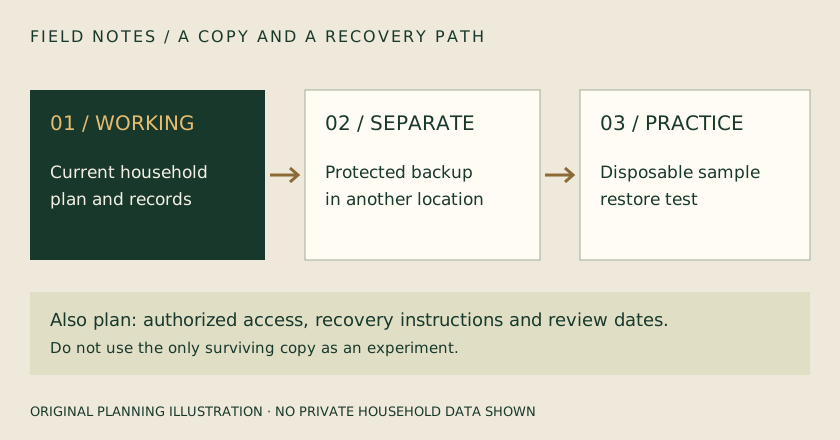
Separate a second copy from a recovery plan, and practice with disposable data first.
Decide what you are protecting
List the household-created information you would find difficult to replace: the current plan, contact sheet, selected records and notes. Distinguish these from application files and public references that may be obtainable again later. A software update, activation file and household backup serve different purposes. Record what each export includes before relying on it. Do not assume that copying a shortcut, a browser tab or a folder name preserves the underlying content. Check the product’s documented backup scope and note any files you must copy separately.
Keep a separate copy
A duplicate folder on the same working drive may protect against an accidental edit, but it does not protect against loss or failure of that drive. Keep an appropriate second copy in a separate safe location. Consider how the authorized household members would obtain it if the usual computer or record keeper were unavailable. Avoid placing sensitive records on an unprotected shared device just to create another copy. Match the protection to the contents, and make sure the recovery information is not lost with the device it is meant to unlock.
Label the backup clearly
Use a descriptive label with the date and the application or export format when relevant. Keep a brief note of what was included, where the backup is stored and whether it has been tested. Several files named ‘final backup’ are difficult to distinguish when time matters. Preserve the original export rather than opening it in a tool that may rewrite it unexpectedly. Keep any checksum supplied by the application with the file. A checksum can help detect changed bytes; it does not prove that the backup contains every record you intended to include.
Test with disposable information
Before restoring over real household data, practice using a clearly labeled sample in an appropriate test environment. Follow the documented restore procedure and confirm the actual records after the operation. Check whether restoring replaces current information, merges it or creates a separate copy. A message saying ‘restore complete’ is useful evidence but should be followed by opening the sample records. If you cannot test safely without affecting production data, stop and use the product’s supported recovery instructions or support path. Do not experiment on the only surviving copy.
Plan for updates and conflicts
A backup that worked with one release may need a documented migration when the application changes. Keep the release or format information with the backup and read update instructions before applying it. If two people have edited different copies of a plan, preserve both until you have compared them. Do not assume the newest file timestamp means its content is the most complete. Record which copy becomes the new working version and make a fresh backup after the review. Avoid overwriting evidence of a problem while trying to repair it.
Make recovery an ordinary habit
Choose a review interval that fits how often the information changes, and repeat the test after significant software or hardware changes. Confirm that the separate copy still opens and that the authorized people can find the instructions. Remove unnecessary sensitive duplicates carefully, using the appropriate method for the device and material. Keep a short problem log so you do not repeat the same uncertain experiment. A backup plan is complete only when someone can locate the copy, unlock it when necessary and use a supported path to recover the needed information.
Backup and restore log
Information included / excluded: __________________ Application / export format / release: __________________ Backup date / filename / location: __________________ Separate-copy location and authorized access: __________________ Protection / recovery-information location: __________________ Disposable restore test date and environment: __________________ Records actually opened after restore: __________________ Conflicts or gaps found: __________________ Next backup / next restore test: __________________